The Sources Tab and Export in AnswerRank: Every Filter and Column Explained
6 min read
The Sources tab shows which websites AI tools read and cite when they answer the prompts you track. You can use it in two ways:
- The Sources page inside AnswerRank gives you the big picture: which websites matter most, how often they are cited and by which AI models.
- The export gives you the details behind that picture: every prompt, every source page and every brand mentioned, row by row, in a spreadsheet.
Use the page to decide where to look. Use the export to see exactly what happened in each answer. This guide explains every filter and every column in both.
The filters
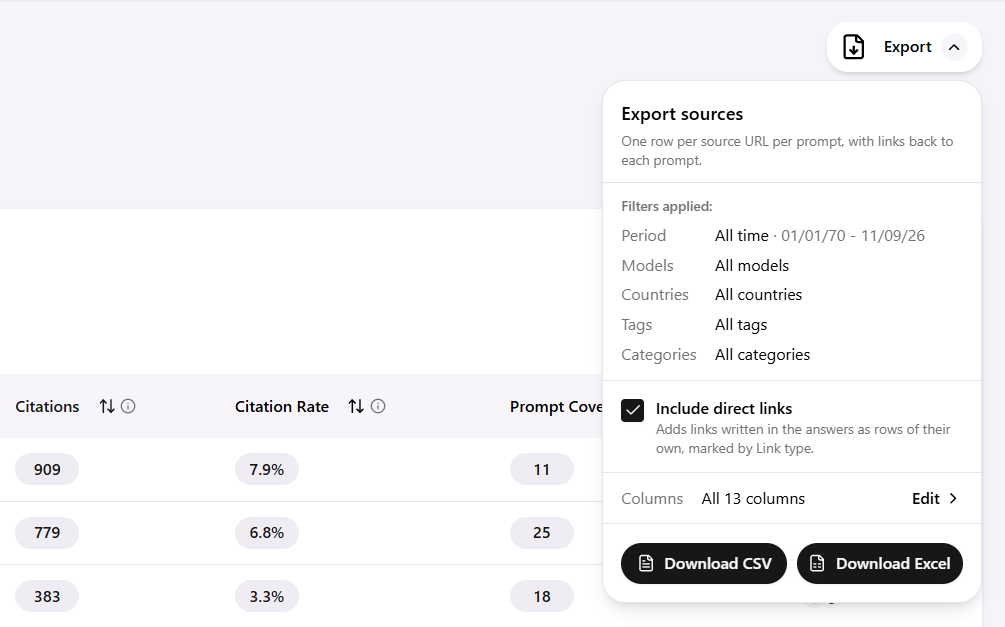
The filters at the top of the Sources tab decide which data you see. Whatever you choose here is copied into the export, so the spreadsheet always matches what was on screen. Before exporting, check the filters first.
| Filter | What it does | When to change it |
|---|---|---|
| Period | The date range of the AI answers included | Compare this month with last month, or look at the weeks after a change you made |
| Models | Which AI models' answers are included | Look at ChatGPT and Gemini separately, because they often use different sources |
| Countries | Which countries' prompts are included | Check each market on its own if you sell in several countries |
| Tags | Which prompt tags are included | Focus on one group of prompts, such as "buying questions" or one product line |
| Categories | Which types of websites are shown | Show only Retailer, Editorial or Review sites when planning one kind of action |
| Include direct links | Adds links that the AI wrote straight into the answer text, marked in the Link type column | Turn it on when you want the full list of pages the AI pointed people to |
Tip: tags are only as useful as the way you set them up. Tagging prompts by intent, audience or product line makes these filters much more powerful.
What you see on the Sources page
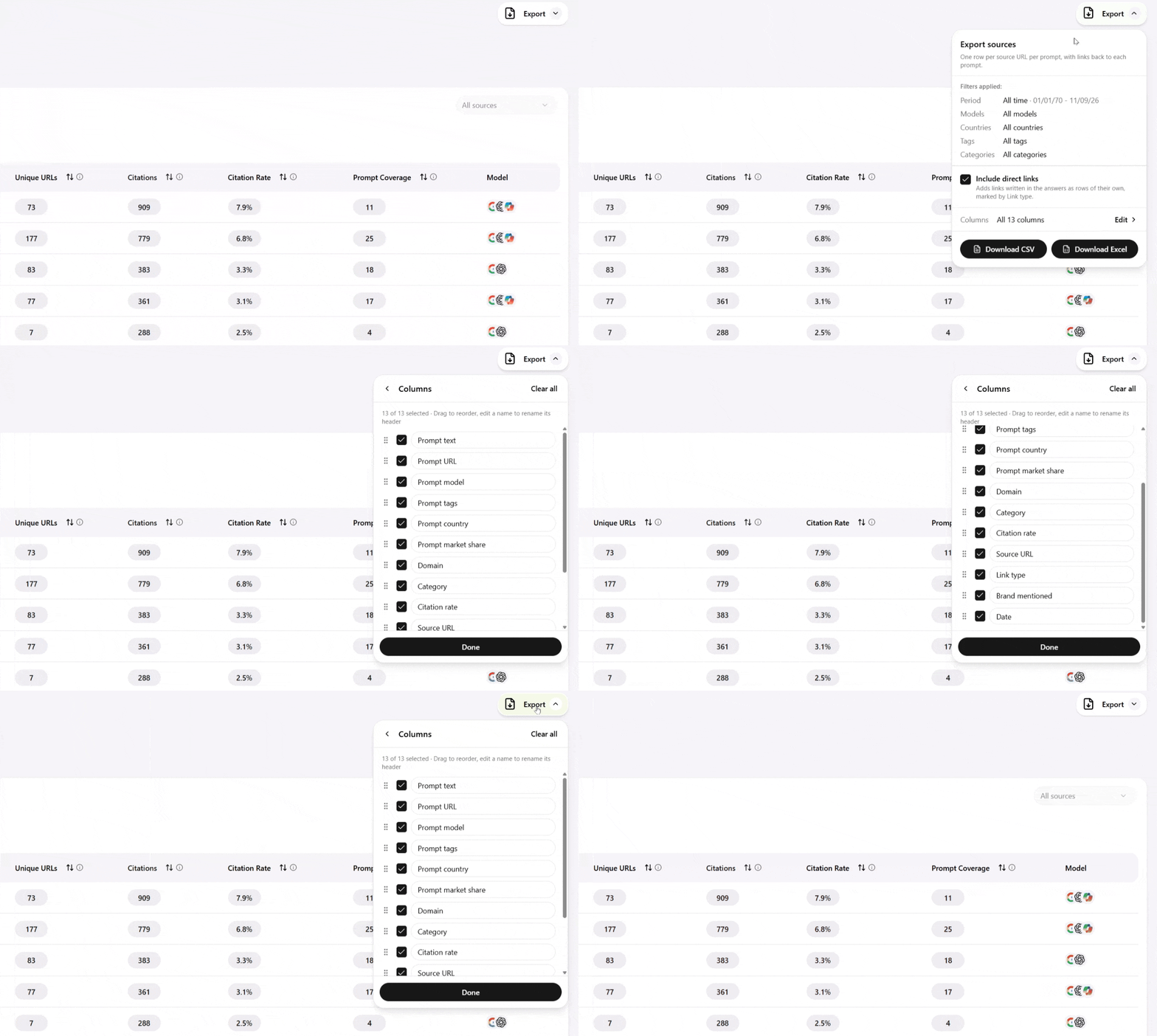
The page shows one row per website. Each row adds up everything that website contributed across your prompts.
| Column | What it means |
|---|---|
| Domain | The website's name, such as example.com |
| Category | The type of website: Retailer, Editorial, Review, Corporate or community sites such as forums |
| Unique URLs | How many different pages of this website the AI used |
| Citations | How many times in total the AI used this website |
| Citation Rate | This website's share of all citations: 5% means 5 of every 100 citations went to it |
| Prompt Coverage | In how many of your prompts this website appeared |
| Model | Icons showing which AI models used this website |
Click the arrows next to a column name to sort, and type a website into Filter Domain to find it, including your own. Open any website to see the exact pages the AI used.
Reading two numbers together: divide Citations by Prompt Coverage. A low result means the website appears in many answers but is used lightly (wide). A high result means it appears in fewer answers but the AI leans on it heavily (deep).
The export, column by column
The Sources page adds things up; the export lists them one by one. Each row connects a prompt and the AI's answer to a source page it used. The columns fall into three groups.
About the prompt
| Column | What it means |
|---|---|
| Prompt text | The exact question that was asked |
| Prompt URL | A direct link back to that prompt in AnswerRank |
| Prompts model | The AI model that wrote the answer, such as GPT-4o, Claude or Gemini |
| Prompt tag | The tags you gave the prompt |
| Prompt country | The country the prompt is linked to |
| Prompt market share | An estimate of how popular the prompt is in the selected period |
About the source
| Column | What it means |
|---|---|
| Domain | The website the source belongs to |
| Category | The type of website, such as Retailer or Editorial |
| Citation rate | How often this source is cited across the relevant prompts |
| Source URL | The full address of the exact page used |
| Link type | A normal citation, or a direct link written into the answer text |
About the answer
| Column | What it means |
|---|---|
| Brand mentions | Your brand, when it is mentioned in this answer; empty when it is not |
| Date | When this source appeared in the answer |
Citations and direct links: what's the difference?
The Link type column separates two ways a website can appear in an answer:
- Citation: a source the AI used to write the answer, usually shown as a reference or a link next to a sentence. It tells you who the AI listens to.
- Direct link: a URL the AI wrote straight into the text of the answer, for example "you can buy it at example.com/product". It tells you where the AI sends people.
The two are not always the same. The AI might read a magazine review (a citation) and then send the reader to a store's product page (a direct link). Both matter: citations shape what the AI says, and direct links shape where people click.
Direct links only appear in the data when Include direct links is turned on in the filters.
One example row, read step by step
Here is one made-up row from an export, shown top to bottom:
| Column | Value |
|---|---|
| Prompt text | Best moisturizer for dry skin in winter |
| Prompt URL | Link to the prompt in AnswerRank |
| Prompts model | Gemini |
| Prompt tag | Best-of questions |
| Prompt country | Germany |
| Prompt market share | 4.2% |
| Domain | beauty-magazine.example |
| Category | Editorial |
| Citation rate | 3.1% |
| Source URL | beauty-magazine.example/best-winter-moisturizers |
| Link type | Citation |
| Brand mentions | (empty) |
| Date | 2026-10-14 |
Read together, it says: when people in Germany asked Gemini for the best winter moisturizer, Gemini used a "best winter moisturizers" article from a beauty magazine as a source. That magazine is an important source in general, and the empty Brand mentions cell means your brand was not mentioned in this answer.
What to do with it: your brand is missing here, so open the Source URL. That exact article is the page to get into. Read it, or open the Prompt URL to see the full answer, to find out which competitors are mentioned instead.
Five useful things to do with the export
- Find the pages to get into. Filter Brand mentions for empty cells, then sort by Citation rate. The Source URLs at the top are the exact articles and product pages where the AI looks but your brand is not mentioned. Open them to see which competitors are.
- See where you already win. Filter Brand mentions for your brand. These are the sources already working for you; keep the information there accurate and up to date.
- Compare AI models. Group rows by Prompts model and Domain. Websites used by only one model need a different approach from websites used by all of them.
- Focus on the questions that matter. Sort by Prompt market share to see which sources appear in the most popular questions, and start there.
- Track change over time. Export the same filters every month and compare by Date. New domains, lost domains and changes in Brand mentions show whether your actions are working.
One last tip: before you export, write down the filters you used, or keep them identical every month. Two exports with different filters cannot be compared fairly.